
 成为VIP
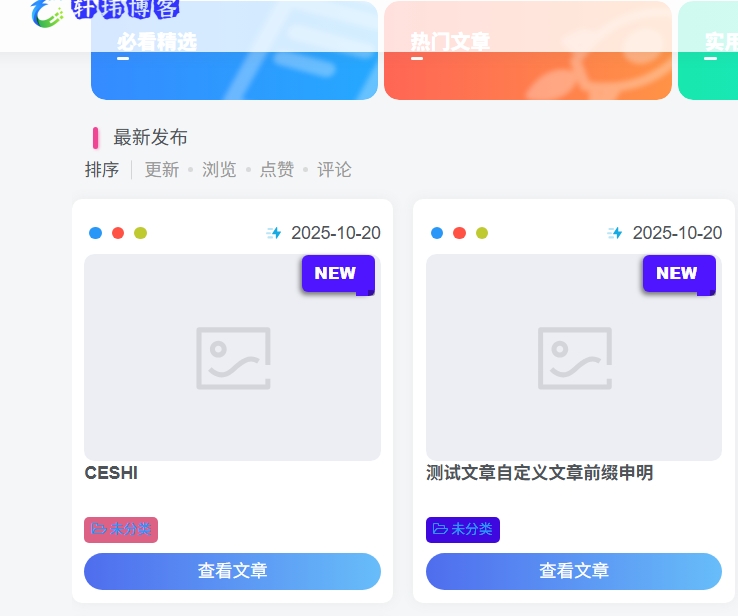
成为VIP来自MAC大佬的又一款非常美观又实用的新发布文章列表角标,每个新发布的文章都会自动添加,用来提醒用户这篇文章是今日新发布的,有利于用户交互。
效果图:
教程开始
在主题目录 function 文件添加如下代码。
文件路径:wp-content/themes/zibll/function.php(或func.php)
/* 新文章发布角标 moxingbk.com */
function add_zbfox_new_post_label($title, $id) {
    if (!is_admin() && !is_single()) {
        $post_time = get_the_time('U', $id);
        if (time() - $post_time <= 24 * 60 * 60) {
            $title .= ' <div class="zbfox_new_post_label">NEW</div>';
        }
    }
    return $title;
}
add_filter('the_title', 'add_zbfox_new_post_label', 10, 2);
子比主题后台设置->自定义代码->自定义CSS样式:
/* 新文章发布图标样式 xuwbk.com */
.posts-item{
    position: relative;
    overflow: visible;
}

.zbfox_new_post_label{
    position: absolute;
    top: 45px;
    right: 20px;
    padding: 5px 10px;
    background: #4f15ff;
    box-shadow: -1px 2px 4px rgba(0, 0, 0, 0.5);
    color: #fff;
    font-size: 13px;
    font-weight: 900;
    border-radius: 5px 0 0 5px;
}

.posts-item:hover .zbfox_new_post_label {
    opacity: 0;
    transition: opacity 0.5s ease;
}

.zbfox_new_post_label:before {
    position: absolute;
    content: " ";
    display: block;
    width: 15px;
    height: 110%;
    padding: 0 0 5px;
    top: 0;
    right: -5px;
    background: inherit;
    border-radius: 0 5px 5px 0;
}

.zbfox_new_post_label:after {
    position: absolute;
    content: " ";
    display: block;
    width: 5px;
    height: 5px;
    background: rgba(0, 0, 0, 0.35);
    bottom: -3px;
    right: -5px;
    border-radius: 0 5px 5px 0;
}
主题授权提示:请在后台主题设置-主题授权-激活主题的正版授权,授权购买:RiTheme官网
声明:本站所有文章,如无特殊说明或标注,均为本站原创发布。任何个人或组织,在未征得本站同意时,禁止复制、盗用、采集、发布本站内容到任何网站、书籍等各类媒体平台。如若本站内容侵犯了原著者的合法权益,可联系我们进行处理。

评论(0)